|
TachyonUI 1.1.0
High-performance UI for building tools.
|
A CurveField's curves, kept by the app from frame to frame. More...
#include <gui_controls/gui_curve_types.h>
Public Attributes | |
| std::vector< CurveChannel > | channels |
| one for a plain curve; four for a color's R, G, B and A | |
| CurveRange | range |
| What the field shows, and where the editor opens. | |
| bool | clampValues = false |
| std::vector< CurvePreset > | presets |
| The thumbnails under the plot; empty: DefaultCurvePresets(). | |
| float | fps = 0.0f |
| Frames a second, for animation curves: times show as frames, keys land on them, and the editor lays out as an animation editor: the interpolation and tangents over the plot, a frame ruler with the playhead, no presets. | |
| float | playhead = 0.0f |
| The playhead, in seconds, with fps set: on the ruler and through the plot, and each channel's value there in the tree. | |
| std::function< void(float time)> | onPlayheadChanged |
| The user moved the playhead on the ruler (already set): sync your timeline. | |
| std::function< void(const CurveEdit &)> | onEdit |
| A change the user made, already applied: put it in the undo history. | |
| uint32_t | revision = 0 |
| Raised by each edit applied, so every view of the curves can tell they changed. | |
A CurveField's curves, kept by the app from frame to frame.
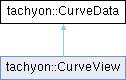
Everything the user changes comes to the app as a CurveEdit (onEdit), already applied, for its undo history. Show them with CurveField or CurveEditor: a CurveView for one place, or this and a CurveViewState per view to show them in several.
| std::vector<CurveChannel> tachyon::CurveData::channels |
one for a plain curve; four for a color's R, G, B and A
| CurveRange tachyon::CurveData::range |
What the field shows, and where the editor opens.
Keys stay in its time span; in its value span too with clampValues.
| bool tachyon::CurveData::clampValues = false |
| std::vector<CurvePreset> tachyon::CurveData::presets |
The thumbnails under the plot; empty: DefaultCurvePresets().
| float tachyon::CurveData::fps = 0.0f |
Frames a second, for animation curves: times show as frames, keys land on them, and the editor lays out as an animation editor: the interpolation and tangents over the plot, a frame ruler with the playhead, no presets.
0: plain times.
| float tachyon::CurveData::playhead = 0.0f |
The playhead, in seconds, with fps set: on the ruler and through the plot, and each channel's value there in the tree.
| std::function<void(float time)> tachyon::CurveData::onPlayheadChanged |
The user moved the playhead on the ruler (already set): sync your timeline.
| std::function<void(const CurveEdit&)> tachyon::CurveData::onEdit |
A change the user made, already applied: put it in the undo history.
| uint32_t tachyon::CurveData::revision = 0 |
Raised by each edit applied, so every view of the curves can tell they changed.
 1.18.0